☁️ Evolution of Cloud Computing
1. Why Cloud Computing Matters for Data Warehousing 💡
Cloud computing means consuming technology capabilities—such as compute, storage, databases, networking, security, software, and analytics—as services over a network.
For business users, the simplest way to understand it is this:
Instead of buying and maintaining fixed hardware years in advance, organizations can provision capacity when they need it, scale it up or down, and pay based on usage.
This shift changed data warehousing dramatically. Traditional warehouses were often limited by fixed servers, expensive upgrades, and long procurement cycles. Cloud data platforms make it easier to:
- Store and process large volumes of structured, semi-structured, and streaming data
- Scale compute for month-end reporting, peak business events, or large data loads
- Support more users and workloads without buying dedicated hardware for every team
- Integrate data from SaaS applications, operational systems, files, APIs, and data lakes
- Improve disaster recovery, availability, and global access
- Move infrastructure spending from large upfront capital expense to usage-based operating expense
Cloud does not remove all responsibility. Teams still need to design secure access, control cost, govern data, choose regions carefully, and monitor workloads.
2. A Brief Evolution of Cloud Computing 🕰️
Cloud computing became mainstream in the 2000s, but its roots go back much further to mainframes, time-sharing, networking, and virtualization.
| Period | What changed | Why it mattered for data |
|---|---|---|
| 1960s–1990s: Centralized computing and virtualization | Mainframes, time-sharing, client-server systems, and virtual machines proved that many users and workloads could share powerful infrastructure. | Organizations learned to centralize processing, but capacity was still mostly fixed and hardware-led. |
| 2000s: Utility computing and SaaS adoption | Cloud providers made compute and storage available on demand. SaaS applications such as CRM systems showed that business-critical software could run outside the company data center. | Companies began moving workloads from owned hardware to provider-managed services. |
| 2010s: Managed services and cloud analytics | Cloud platforms expanded into managed databases, object storage, data pipelines, machine learning, and cloud data warehouses. | Data teams could build platforms faster and rely less on manual infrastructure administration. |
| 2020s: Modern data cloud, AI, governance, and multi-cloud | Cloud data platforms added stronger automation, collaboration, secure sharing, AI/ML capabilities, data governance, and cross-cloud patterns. | The focus shifted from “where are the servers?” to “how fast can we deliver trusted data and insights?” |
For Snowflake learners, the key evolution is this: data warehousing moved from hardware-centered platforms to elastic, managed, service-based platforms.
3. Types of Cloud Computing Services ☁️💻
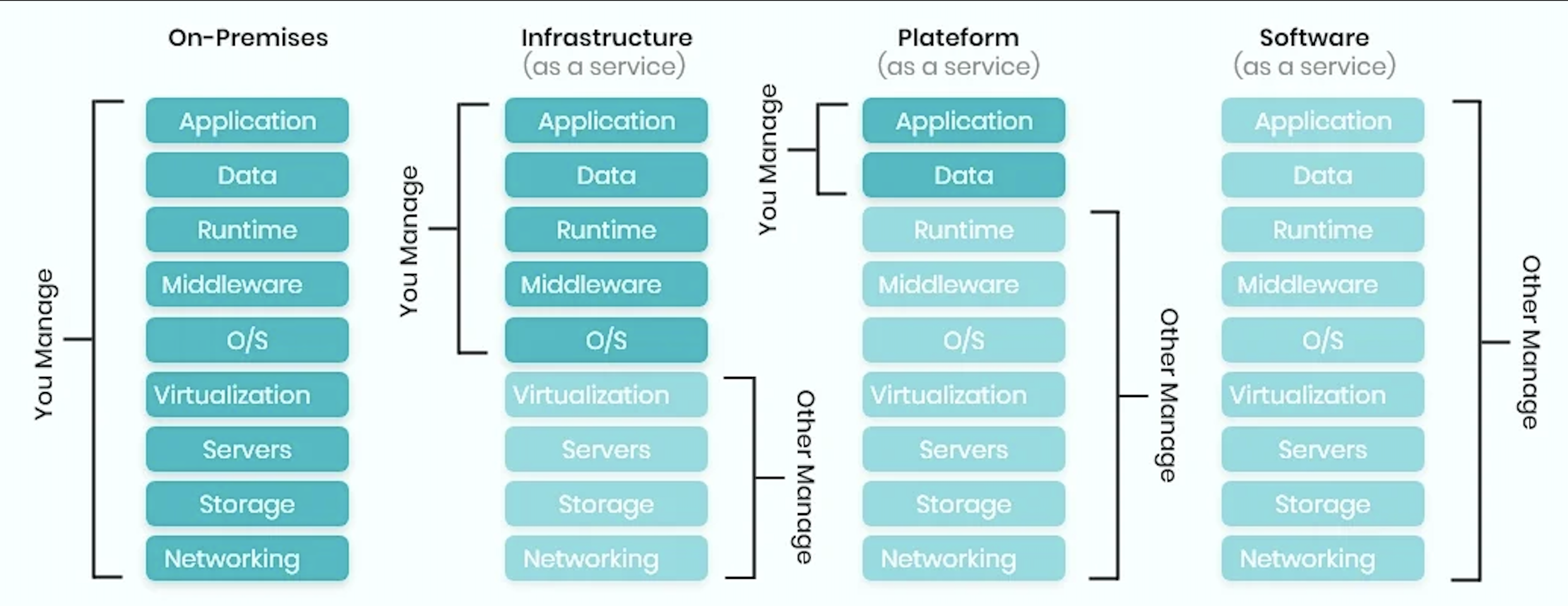
A clearer way to think about this section is cloud service models. They explain the division of responsibility between the customer and the cloud/service provider. This matters because it affects cost, skills, security, operations, and speed of delivery.
| Model | Business meaning | Customer usually manages | Provider usually manages | Data platform relevance |
|---|---|---|---|---|
| IaaS Infrastructure as a Service | Rent infrastructure building blocks. | Operating system, database software, patching above the OS, scaling design, backups, tuning, data security configuration. | Physical data center, servers, storage hardware, networking, virtualization. | Useful for lift-and-shift or highly customized platforms, but it still leaves significant administration work for the customer. |
| PaaS / Managed Services Platform as a Service | Use managed runtimes, databases, and platform services. | Data model, application logic, access design, workload configuration, usage monitoring. | Much of the OS, runtime, patching, scaling, availability, and platform operations. | Common for managed databases, data processing services, orchestration tools, and cloud-native analytics services. |
| SaaS Software as a Service | Use a complete application or platform delivered as a service. | Business configuration, users, roles, data, integrations, governance, cost controls, workload design. | Application/platform operations, infrastructure, upgrades, availability, many performance/maintenance tasks. | Snowflake is commonly consumed this way: customers use the data platform without managing servers, disks, operating systems, or database software installation. |
Why this distinction matters
- More control usually means more responsibility. IaaS gives flexibility, but the customer manages more.
- More management by the provider usually means faster delivery. SaaS and managed services reduce infrastructure work.
- Managed does not mean “no design needed.” Teams still need good data modeling, security, governance, workload isolation, and cost monitoring.
- Classifications can vary by vendor. Some cloud data warehouse services are described as PaaS, SaaS, serverless, or fully managed depending on the vendor and context. The important point is understanding who operates each layer.
🏗️ Logical Architecture (Visual Reference)
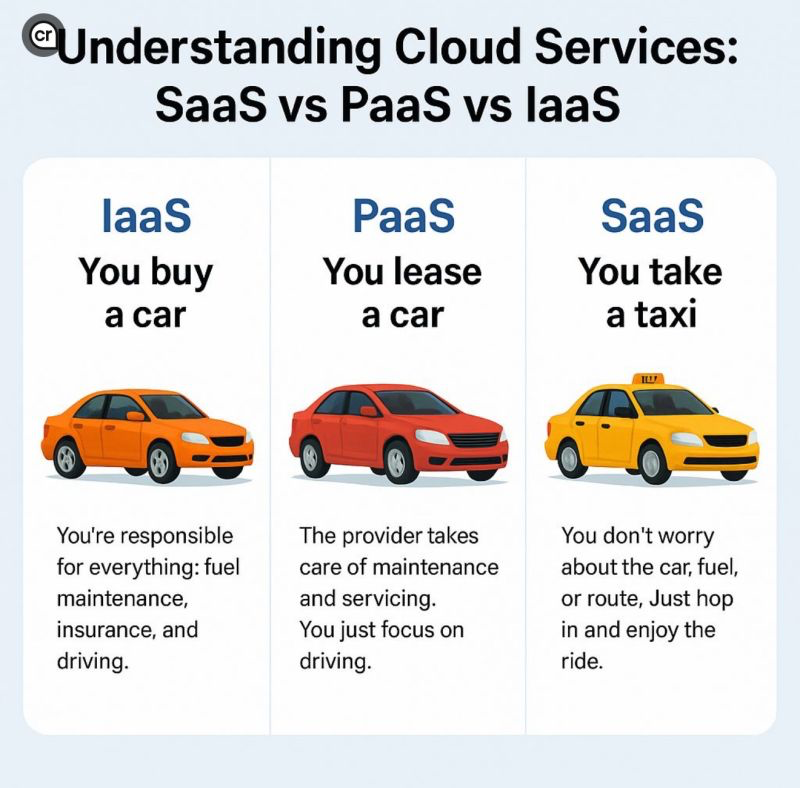
🤣 Car-Based Cloud Architecture: Because Nothing Else Was Confusing Enough
To simplify the service models, imagine transportation instead of technology:
- IaaS is like renting a car. You do not own the car, but you still drive it, fuel it, navigate, and handle many decisions.
- PaaS is like using a managed car service where more of the operating details are handled for you.
- SaaS is like taking a ride-hailing service. You care about the destination and service quality, not the engine, tires, or maintenance schedule.
4. Types of Cloud Deployment Models ☁️🔐
Deployment models answer a different question from service models.
- Service model asks: Who manages what?
- Deployment model asks: Where does the cloud capability run, and how is it used by the organization?
Is this section required for Snowflake training?
Yes—but keep it practical. Business users and data professionals should know the vocabulary because it appears in architecture discussions, risk reviews, vendor evaluations, and migration plans. However, for Snowflake training, deployment models should not become the main focus.
Snowflake is primarily consumed as a managed data platform running on public cloud infrastructure. Customers usually choose the cloud provider, region, edition, networking approach, identity integration, and governance model—they do not install Snowflake software on their own servers.
| Deployment model | What it means | Relevance to Snowflake and cloud data warehousing |
|---|---|---|
| Public Cloud 🌍 | Infrastructure is owned and operated by a cloud provider such as AWS, Azure, or Google Cloud. Multiple customers share the provider’s infrastructure, with logical isolation between tenants. | This is the most common foundation for modern cloud data platforms. Snowflake accounts run on selected public cloud providers and regions. |
| Private Cloud 🏢 | Cloud-like infrastructure is dedicated to one organization, either on-premises or hosted by a provider. | Useful vocabulary for legacy, regulated, or highly controlled environments. In normal Snowflake usage, customers do not deploy Snowflake into their own private cloud. |
| Hybrid Cloud ⚖️ | A combination of on-premises/private environments and public cloud services. | Very common during migration. For example, source systems may remain on-premises while analytical data is loaded into Snowflake. Key concerns include connectivity, latency, security, and data movement. |
| Multi-Cloud ☁️☁️ | An organization uses services from more than one public cloud provider. | Snowflake supports a multi-cloud strategy because it is available across major cloud providers. But an individual Snowflake account is still created in a specific cloud and region, so replication, sharing, disaster recovery, and integration patterns must be designed deliberately. |
Practical questions architects and business teams should ask
- Which cloud provider and region best support our users, compliance needs, data residency requirements, and existing systems?
- What data can move to the cloud, and what must stay on-premises or in a specific geography?
- How will users connect securely through SSO, networking controls, roles, and policies?
- What are the expected data volumes, query patterns, concurrency, and peak usage periods?
- How will we monitor spend, set budgets, tag usage, and prevent waste?
5. Major Cloud Providers and Data Services 🌍
The major public cloud providers offer infrastructure and platform services used across modern data architectures.
| Provider | Common data services | Typical role in a data architecture |
|---|---|---|
| Amazon Web Services (AWS) 🌐 | Amazon S3, Amazon Redshift, AWS Glue, AWS Lambda, Amazon Kinesis, IAM. | Object storage, data lake foundations, data warehousing, event processing, serverless compute, identity and access controls. |
| Microsoft Azure 🔵 | Azure Storage / ADLS, Azure Synapse Analytics, Azure Data Factory, Microsoft Fabric, Microsoft Entra ID. | Strong enterprise integration, Microsoft ecosystem alignment, data lakes, pipelines, analytics, identity, and BI integration. |
| Google Cloud Platform (GCP) 🟢 | Google Cloud Storage, BigQuery, Dataflow, Pub/Sub, Dataproc, Vertex AI. | Serverless analytics, large-scale data processing, streaming, machine learning, and AI-centric workloads. |
Cloud data warehouse platforms such as Snowflake, BigQuery, Amazon Redshift, and Azure Synapse compete and integrate in this ecosystem. The right choice depends on architecture, skills, governance, ecosystem alignment, performance needs, and commercial strategy.
6. Important Points Often Missed in Cloud Discussions 🧭
1. Elastic does not automatically mean cheap
Cloud platforms can scale quickly, but uncontrolled workloads can also create unexpected cost. Good teams use auto-suspend, resource monitors, tagging, budgets, alerts, and workload review.
2. Managed service does not remove data ownership
The provider manages the platform, but the organization still owns the data strategy: quality, definitions, lineage, access, privacy, retention, and regulatory compliance.
3. Region selection is a business decision
Cloud region affects latency, availability, disaster recovery, legal requirements, and sometimes cost. It should not be treated as a random technical choice.
4. Moving data has cost and risk
Data transfer, replication, ingestion latency, and cross-region/cross-cloud movement can affect architecture and cost. Design data movement intentionally.
5. Multi-cloud is a strategy, not magic portability
Using multiple clouds can reduce concentration risk and improve flexibility, but it can also increase integration complexity, governance effort, and operational cost.
6. Security is shared responsibility
Cloud providers secure the infrastructure and platform layers they operate. Customers still need to configure identity, roles, network policies, encryption options, data masking, auditing, and operational processes correctly.
🏁 Summary
Cloud computing changed data warehousing by making infrastructure elastic, service-based, and managed. Instead of spending months planning hardware capacity, teams can focus more on delivering governed, trusted, scalable data products.
For this Snowflake course, remember:
- Service models explain who manages each layer.
- Deployment models are useful context, but should be covered briefly and practically.
- Snowflake is consumed as a managed cloud data platform, not as software that most customers install and operate themselves.
- Business value comes from faster analytics, stronger collaboration, scalability, and reduced infrastructure management.
- Success still depends on good architecture, governance, security, cost management, and data ownership.
🔹 Cloud is not just a hosting model. For modern data warehousing, it is an operating model for delivering data faster, safer, and at scale.