❄️ Snowflake + AWS S3 Integration using Storage Integrations
🔐 What is Storage Integration (in Snowflake)?
Storage Integration is a secure, Snowflake-managed connection between Snowflake and cloud storage (like AWS S3), using an IAM role instead of access keys.
👉 Snowflake assumes an IAM role in your AWS account to access S3.
🎯 What Are We Solving?
To load files from AWS S3 into Snowflake without storing AWS credentials in Snowflake, we use Storage Integrations. This leverages IAM Roles and External IDs for secure, auditable access.
✅ Secure Loading Flow: High level - Architecture Overview
📚 Visual Reference Guide: Images at Each Step
As you work through this end-to-end setup, you'll encounter several AWS console screens and Snowflake outputs. Here's where to find each one:
| 📋 Step | 🖼️ Visual Reference | 📝 Details |
|---|---|---|
| AWS - Role Creation | IAM Role Setup | Step-by-step creation of IAM role in AWS console |
| Snowflake Setup | Storage Integration Properties | See the DESC output showing STORAGE_AWS_IAM_USER_ARN and STORAGE_AWS_EXTERNAL_ID |
| AWS - Role Updation | IAM Role Configuration | Interface showing the role creation with trust & permissions policies attached |
| AWS - Trust Policy | Trust Relationships Tab | JSON policy in AWS console - who can assume the role (Snowflake) |
| AWS - Permissions | Permissions Policies Tab | JSON policy in AWS console - what S3 actions are allowed |
| AWS - Execution | STS Assume Role Flow | Runtime interaction between Snowflake and AWS (step 5 below) |
� Before creating the Snowflake Storage Integration
The first step in the flow is to create the AWS IAM role and copy its Role ARN into your Snowflake storage integration definition. The AWS console screenshot below shows the IAM role creation screen and the role summary where you can retrieve the ARN.
Choose the entity for this role
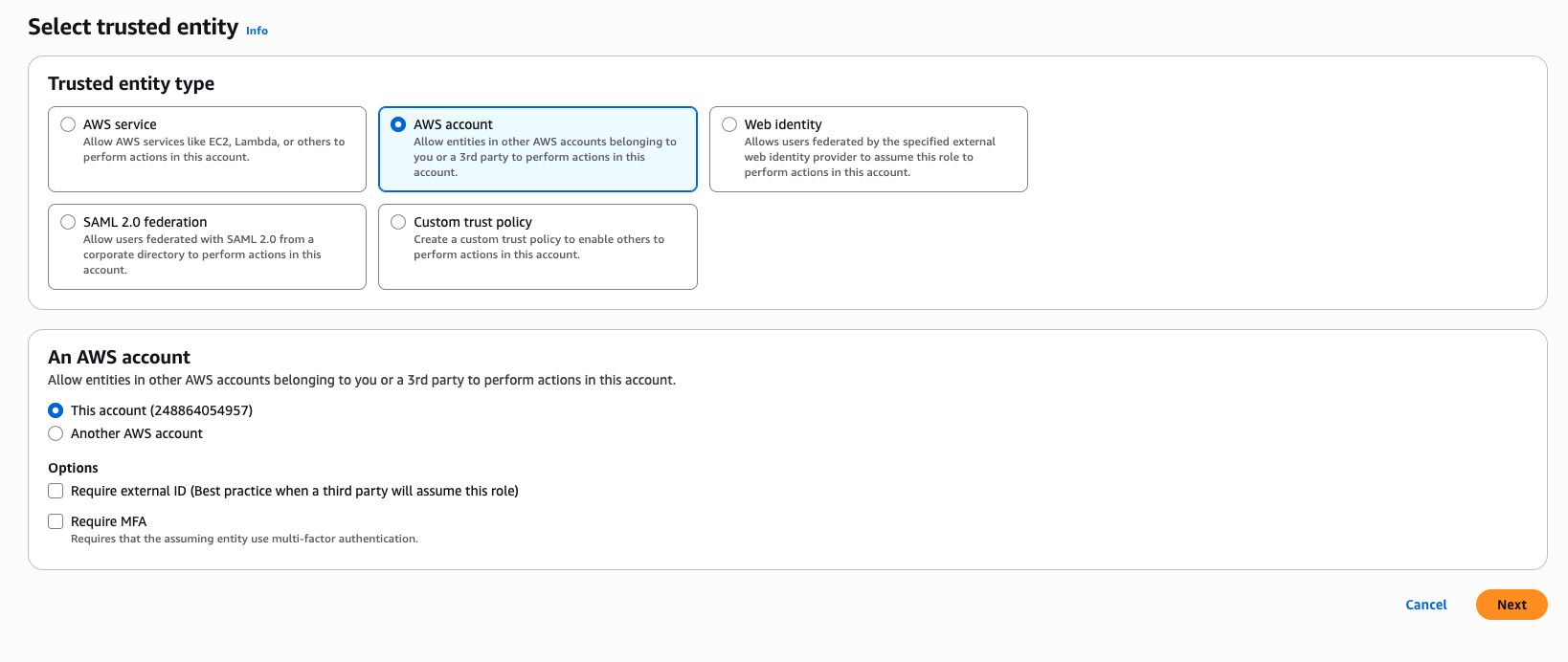

- Use the role ARN from AWS in
STORAGE_AWS_ROLE_ARN. - This is the value Snowflake will use to assume the role via AWS STS.
🔑 Critical Security Values
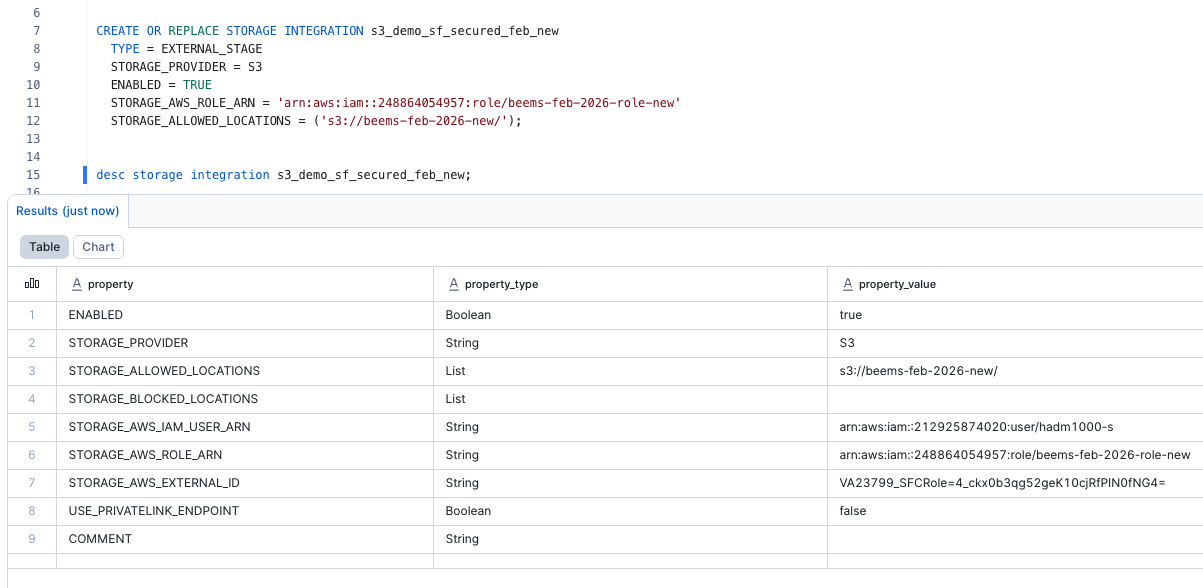
The STORAGE_AWS_IAM_USER_ARN and STORAGE_AWS_EXTERNAL_ID from the DESC output are essential for configuring your AWS IAM role trust policy. Share these values with your AWS administrator.
🔎 Why the Snowflake Storage Integration DESC output matters
When you run DESC STORAGE INTEGRATION, Snowflake returns two critical values that the AWS role setup must use:
STORAGE_AWS_IAM_USER_ARN– this is the Snowflake-generated AWS principal that will assume the IAM role.STORAGE_AWS_EXTERNAL_ID– this is the unique External ID that your AWS trust policy must require to prevent unauthorized role assumption.
Together, these values connect the Snowflake integration with the AWS IAM role securely. They are the exact values you share with the AWS administrator when configuring the role trust relationship.
✅ Key Steps: End-to-End with Concrete Example
1️⃣ Create Storage Integration in Snowflake
CREATE OR REPLACE STORAGE INTEGRATION s3_demo_sf_secured_feb_new
  TYPE = EXTERNAL_STAGE
  STORAGE_PROVIDER = S3
  ENABLED = TRUE
  STORAGE_AWS_ROLE_ARN = 'arn:aws:iam::248864054957:role/beems-feb-2026-role-new'
  STORAGE_ALLOWED_LOCATIONS = ('s3://beems-feb-2026-new/');
Why
TYPE = EXTERNAL_STAGE? This specifies that the integration is for creating external stages in Snowflake. External stages allow you to reference cloud storage locations (like S3 buckets) without copying data into Snowflake tables. This type enables secure, direct access to external data sources while maintaining Snowflake's security model.
- What this does: Authorizes Snowflake to connect to the S3 bucket using an IAM Role (with permissions and trust).
DESC STORAGE INTEGRATION s3_demo_sf_secured_feb_new;
Expected Output Properties:
-
Key Properties to Share with AWS admin:
STORAGE_AWS_IAM_USER_ARN- The ARN Snowflake uses to assume the roleSTORAGE_AWS_EXTERNAL_ID- Security measure to prevent confused deputy attacks
☁️ AWS SIDE OPERATIONS (CRITICAL FOR REAL IMPLEMENTATION)
⚠️ These steps are executed entirely in AWS, typically by a Cloud / IAM Admin.
AWS STS (Security Token Service) is a core AWS security service used to provide temporary, limited-permission credentials when Snowflake accesses AWS resources. In this setup, Snowflake does not use long-lived AWS credentials; instead it assumes an IAM role and receives short-lived credentials from STS.
The very first step is to create the IAM role in AWS, using the trusted entity flow shown in the attached screenshot. This role holds the trust policy and permissions policy that allow Snowflake to access the S3 bucket securely.
1️⃣ Create an IAM Role for Snowflake
Purpose: Allow Snowflake to assume a role securely using AWS STS.
Key Components:
- Trust Policy (who can assume the role)
- Permissions Policy (what the role can access)
📋 You can create this role in the AWS IAM Console:
2️⃣ IAM Trust Policy (External ID + Snowflake ARN)
{
  "Version": "2012-10-17",
  "Statement": [
    {
      "Effect": "Allow",
      "Principal": {
        "AWS": "arn:aws:iam::<SNOWFLAKE_ACCOUNT_ID>:user/<SNOWFLAKE_IAM_USER>"
      },
      "Action": "sts:AssumeRole",
      "Condition": {
        "StringEquals": {
          "sts:ExternalId": "<STORAGE_AWS_EXTERNAL_ID>"
        }
      }
    }
  ]
}
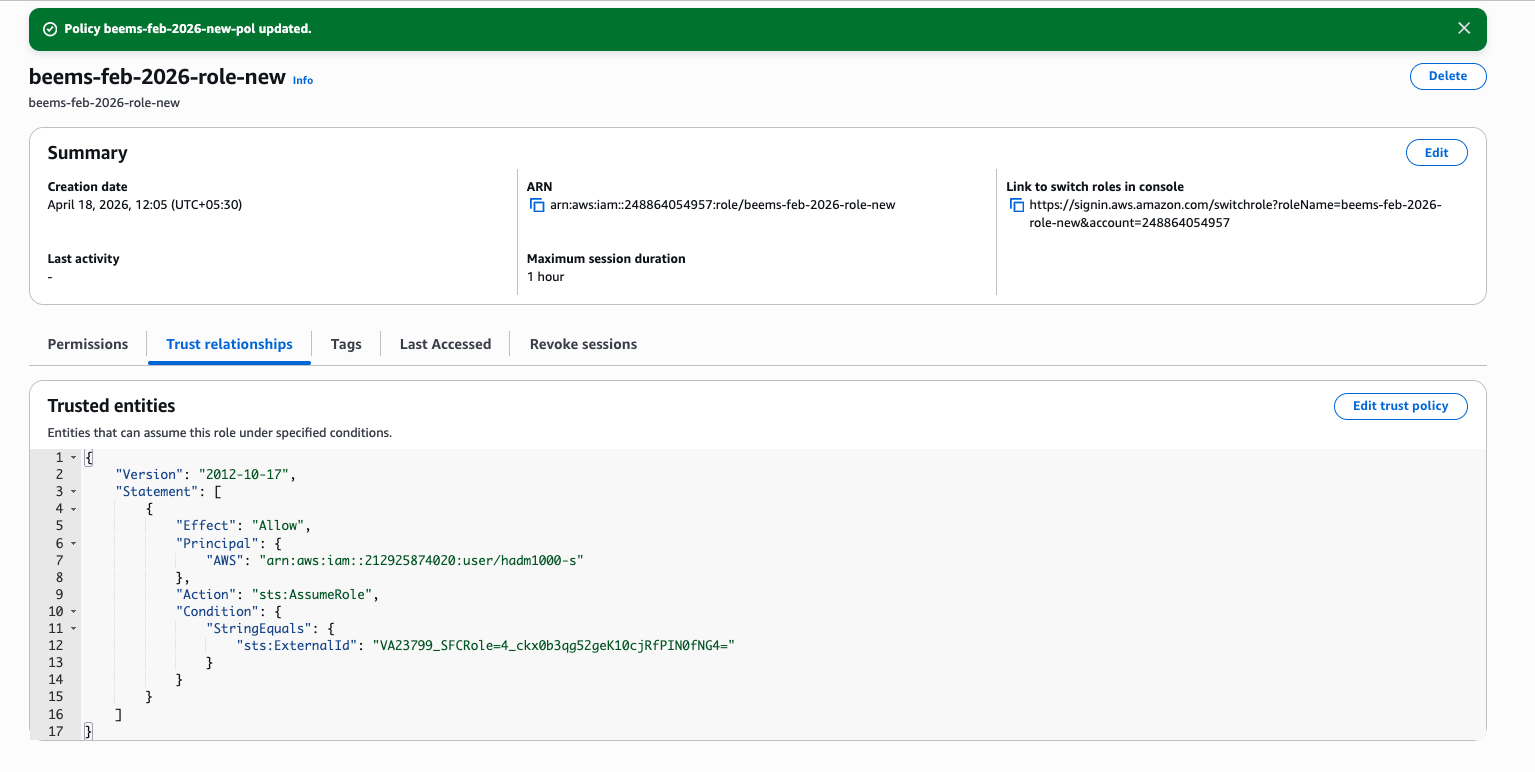
AWS Console View - Trust Relationships Tab:
🔑 Why this matters
- Prevents confused deputy attacks
- Ensures only your Snowflake account can assume this role
- External ID must exactly match Snowflake’s generated value
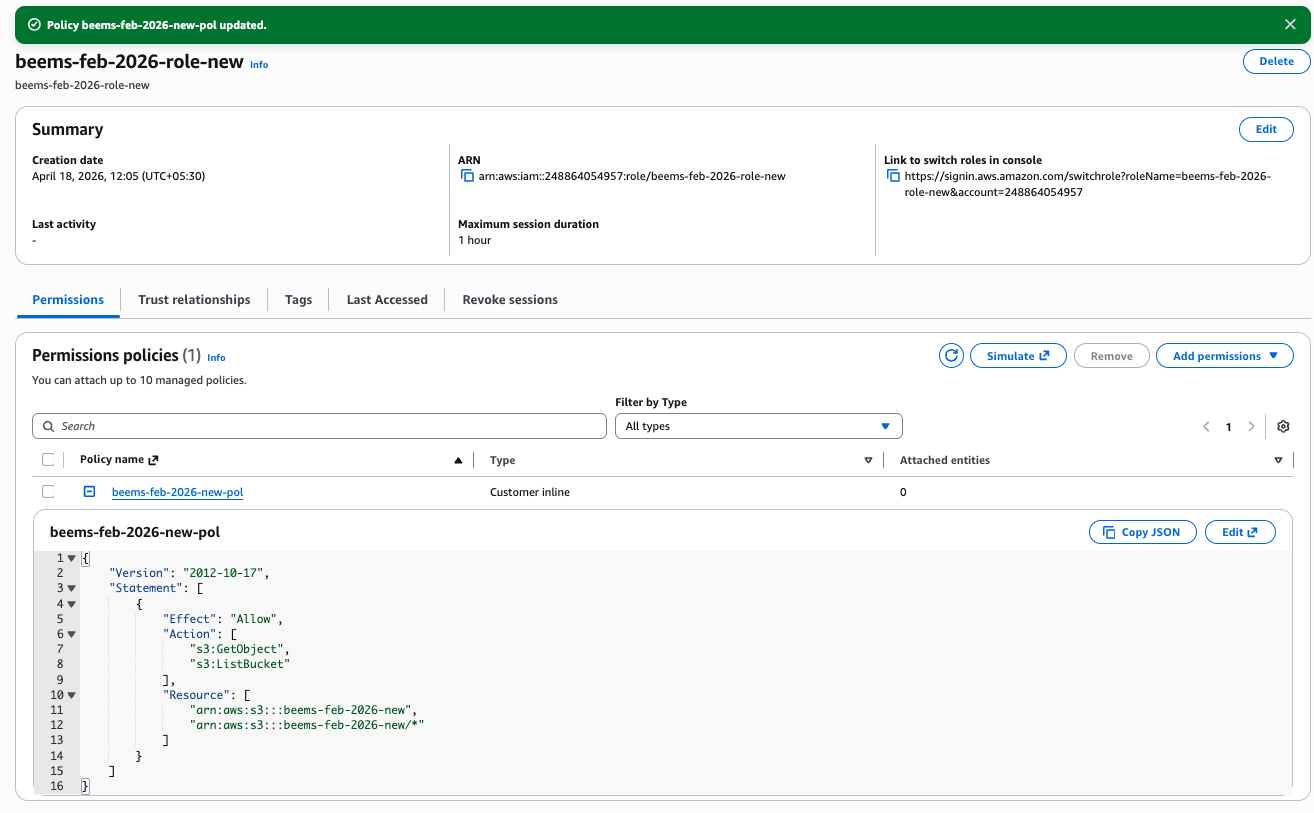
3️⃣ IAM Permissions Policy (Least Privilege S3 Access)
The Permissions Policy defines what actions the role is allowed to perform on which AWS resources (in this case, S3 buckets). This follows the principle of least privilege - granting only the minimum permissions required.
{
  "Version": "2012-10-17",
  "Statement": [
    {
      "Effect": "Allow",
      "Action": [
        "s3:GetObject",
        "s3:ListBucket"
      ],
      "Resource": [
        "arn:aws:s3:::<bucket-name>",
        "arn:aws:s3:::<bucket-name>/*"
      ]
    }
  ]
}
AWS Console View - Permissions Policies Tab:
-
✅ Best Practices
- Grant read-only access unless write is required
- Scope to specific bucket or prefix
- Avoid
s3:*permissions
4️⃣ Why the IAM Permissions Policy is the Primary Control
The IAM Permissions Policy attached to the role is the primary S3 access control. That policy determines whether Snowflake can actually read and list objects in the bucket.
A bucket policy can be added as a second layer of protection in complex setups, but it is not strictly required when the role permissions already grant the correct access. In this lesson we treat it as an optional guardrail, not a duplicate step.
- Use the role permissions policy for the main Snowflake access control.
- Add a bucket policy only if you need explicit bucket-level enforcement or controls for other AWS principals.
4️⃣ What Happens at Runtime (STS Flow)
                  +----------------------+
                  |      Snowflake       |
                  +----------+-----------+
                             |
                             | 1. AssumeRole Request
                             |
                             ▼
                  +----------------------+
                  |      AWS STS         |
                  +----------+-----------+
                             |
                             | Checks Trust Policy
                             |
                             ▼
                  +----------------------+
                  |      IAM Role        |
                  +----------+-----------+
                             |
                             | Temporary Credentials
                             ▼
                  +----------------------+
                  |      Snowflake       |
                  +----------+-----------+
                             |
                             | Read / Write
                             ▼
                  +----------------------+
                  |      S3 Bucket       |
                  +----------------------+
-
Snowflake calls AWS STS
-
STS validates:
- IAM Role trust policy
- External ID
-
STS issues temporary credentials
-
Snowflake reads data from S3
-
Credentials automatically expire
➡️ No access keys are stored anywhere
5️⃣ Create an External Stage Using the Integration
Now that the Storage Integration is created and authorized, we use it to create an External Stage in Snowflake. This stage acts as a reference to the S3 bucket using the secure integration.
CREATE OR REPLACE STAGE aws_s3_si_bucket_stage_new
  URL = 's3://beems-feb-2026-new/'
  STORAGE_INTEGRATION = s3_demo_sf_secured_feb_new
  FILE_FORMAT = (TYPE = CSV FIELD_OPTIONALLY_ENCLOSED_BY = '"' SKIP_HEADER = 1);
- What this does: Creates a stage object (
aws_s3_si_bucket_stage_new) that points to the S3 bucket and authenticates usings3_demo_sf_secured_feb_new.
S3 Bucket Content: What Is Stored in the Bucket
Before verifying the stage, confirm the bucket itself contains the correct file:
si_south_indian_employees.csv
This is the file that Snowflake will read through the external stage.
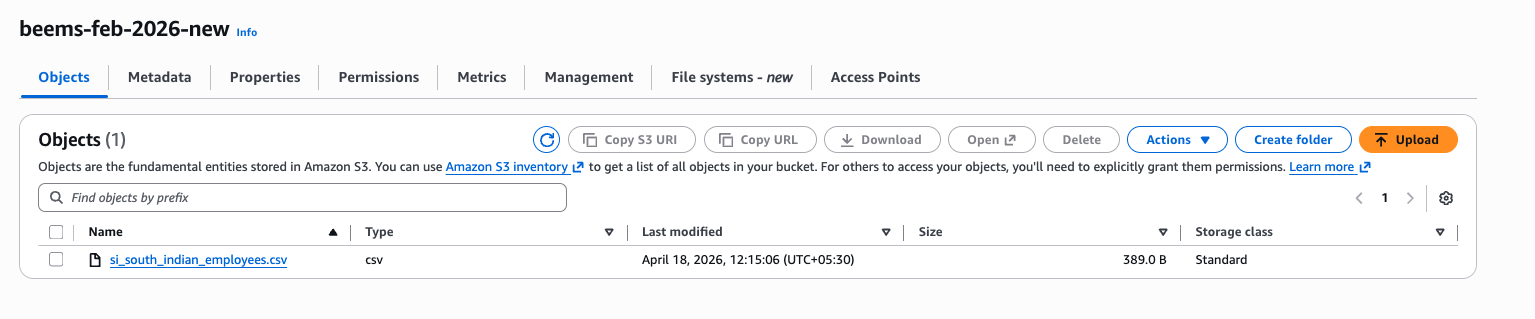
- What this shows: The bucket
s3://beems-feb-2026-new/containssi_south_indian_employees.csv.
Stage List Output: What We Achieved with the Stage
After creating the external stage, verify the same file is visible through Snowflake:
LIST @aws_s3_si_bucket_stage_new;
The output should show:
s3://beems-feb-2026-new/si_south_indian_employees.csv
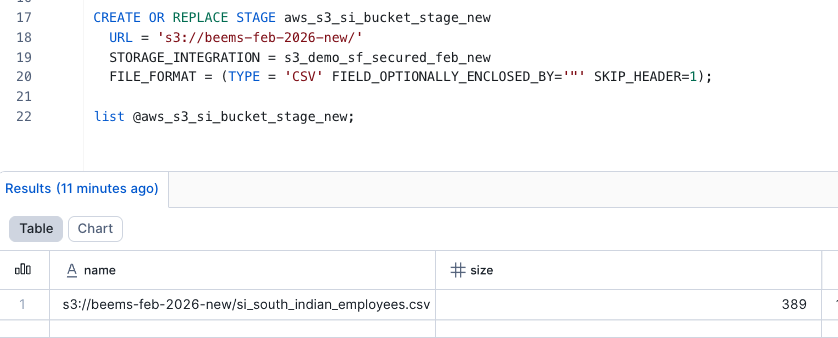
- What this proves: The stage is correctly configured and Snowflake can see the file in the S3 bucket.
6️⃣ Load Data Using COPY INTO
With the external stage securely connected to your S3 bucket, use the COPY INTO command to load S3 data into Snowflake. This is the final step that moves the file contents from the stage into a Snowflake table.
-- First, ensure your target table exists
CREATE OR REPLACE TABLE employee_data (
    emp_id INT,
    first_name STRING,
    last_name STRING,
    department STRING,
    hire_date DATE
);

-- Copy data from the secure external stage into the table
COPY INTO employee_data
FROM @aws_s3_si_bucket_stage_new/si_south_indian_employees.csv
ON_ERROR = 'CONTINUE'; -- or 'ABORT_STATEMENT'
What to expect:
- The command reads
si_south_indian_employees.csvfrom the secure stage - Snowflake parses the CSV using the stage's file format settings
- Rows are loaded into the
employee_datatable
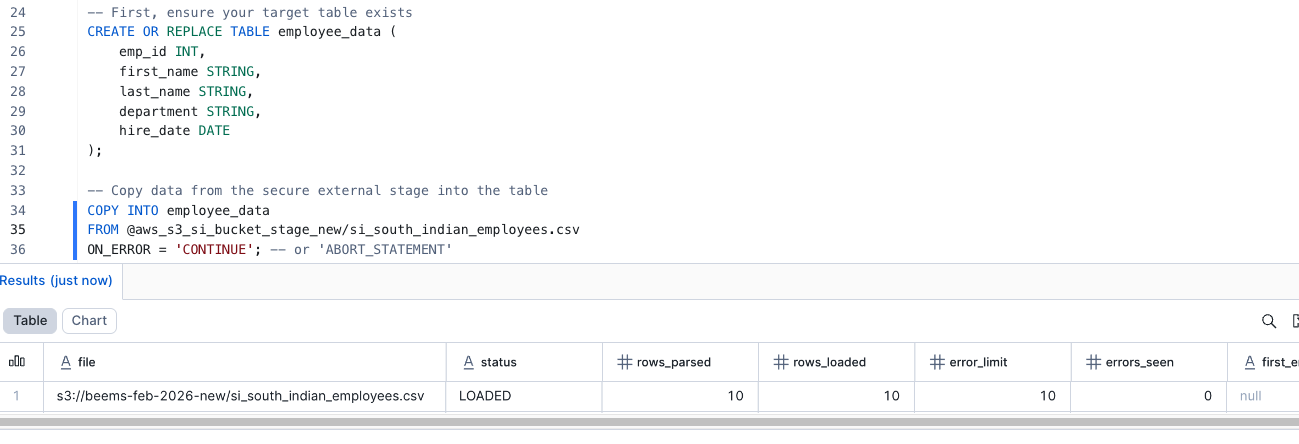
- Result: The screenshot shows the loaded file path, load status, and row count for
si_south_indian_employees.csv.
Why this matters:
- Validates that the secure stage and integration worked end-to-end
- Confirms Snowflake can access the S3 file through the stage
- Shows that data is now available inside Snowflake for queries
-- Validate the loaded data
SELECT * FROM employee_data LIMIT 10;
🧾 Key Security Aspects (For the Trainee)
| 🛡️ Best Practice | Why It Matters |
|---|---|
| No AWS secrets in Snowflake | Uses IAM + STS, not static keys |
| Fine-grained S3 access | Restrict access to bucket/prefix |
| External ID enforcement | Prevents unauthorized role assumption |
| CloudTrail logging | Full audit visibility |
| Easy revocation | Disable IAM role instantly |
✔️ End-to-End Summary Table
| Step | Command/Action | Purpose |
|---|---|---|
| 1️⃣ | Create IAM Role | Define secure access boundary |
| 2️⃣ | Trust Policy + External ID | Authorize Snowflake |
| 3️⃣ | Permissions Policy | Restrict S3 access |
| 4️⃣ | CREATE STORAGE INTEGRATION | Link Snowflake to AWS |
| 5️⃣ | CREATE STAGE | Point to S3 |
| 6️⃣ | COPY INTO | Load data |
| 7️⃣ | SELECT | Validate data |
🎯 Final Takeaway
Snowflake never touches long-lived AWS credentials. It assumes a tightly scoped IAM role using STS, governed by trust policies and External IDs.
This architecture is secure, auditable, compliant, and production-ready.
⚠️ Limitations / Considerations (Important to Know)
While Storage Integrations are the recommended and most secure approach, they do have some practical limitations:
| 🚫 Limitation | ⚠️ Explanation |
|---|---|
| AWS IAM setup required | Requires AWS admin access; Snowflake users alone cannot complete setup |
| Cross-team dependency | Coordination needed between Snowflake, IAM, and Cloud teams |
| Read-only by default | Snowflake can read from S3, but cannot write back natively |
| External ID must match exactly | Any mismatch causes AssumeRole failures |
| No UI-based validation | Debugging IAM trust or policy issues requires AWS logs |
| Region-specific S3 access | Bucket region must be reachable by Snowflake cloud region |
| Latency for very small files | Large numbers of tiny files may impact load performance |
📌 Tip: For write-back use cases, pair Snowflake with AWS Glue, Lambda, or external ETL tools.
💼 Enterprise Best Practices (Highly Recommended)
Follow these practices to ensure your integration is secure, scalable, and audit-ready:
🔐 Security Best Practices
- Always use External ID in IAM trust policies
- Never use long-term AWS access keys
- Grant least privilege (bucket + prefix-level access)
- Avoid
s3:*or wildcard permissions
☁️ AWS Best Practices
- Enable AWS CloudTrail for IAM & S3
- Use environment-specific IAM roles (dev/test/prod)
- Tag IAM roles and S3 buckets for governance
- Use separate buckets or prefixes per workload
❄️ Snowflake Best Practices
- Use one integration per environment
- Lock down
STORAGE_ALLOWED_LOCATIONS - Grant stage access only to required roles
- Monitor
COPY_HISTORYfor load validation
🧪 Operational Best Practices
- Test IAM role assumption before production
- Validate with
LIST @stagebeforeCOPY INTO - Use file patterns to avoid accidental loads
- Monitor failed loads using
VALIDATION_MODE
✅ Summary: Access Keys vs Storage Integrations
This comparison explains why Storage Integrations are the enterprise standard.
| 🔍 Feature | ❌ Access Keys (Legacy) | ✅ Storage Integrations (Recommended) |
|---|---|---|
| Credential Type | Long-lived AWS keys | Temporary STS credentials |
| Security Risk | High (keys can leak) | Very low (no secrets stored) |
| Credential Rotation | Manual & error-prone | Automatic via AWS STS |
| IAM Enforcement | Limited | Full IAM trust & policy enforcement |
| Auditability | Poor | Full visibility via CloudTrail |
| Least Privilege | Hard to enforce | Native support |
| Compliance Ready | ❌ Risky | ✅ HIPAA, SOC2, ISO compliant |
| Production Use | ❌ Not recommended | ✅ Best practice |
🎯 Final Recommendation
Always choose Storage Integrations over access keys for any production or regulated workload.
They provide:
- 🔐 Strong security
- 🔄 Automatic credential rotation
- 📜 Full auditability
- 🧩 Clean separation of duties
- 🚀 Enterprise-scale readiness